
Catch the Coins
Coins fall from the sky and you catch them. This is the first project with a score, which means the first project that has to remember something.
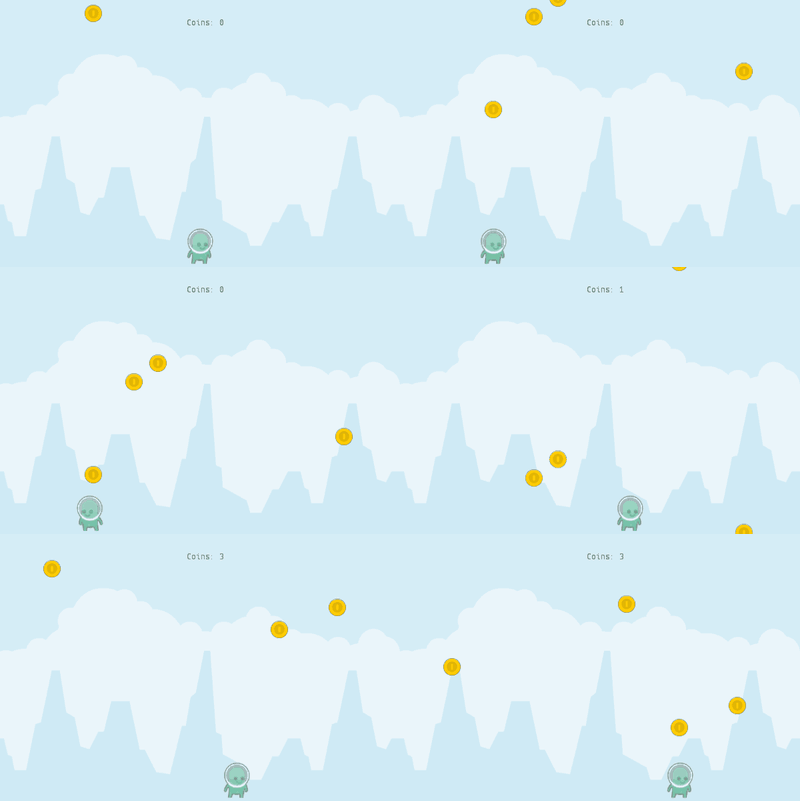
You need nothing but the three classes below. Every picture and sound comes with Scratch for Java.
Step 1: The catcher
Make a class called Basket. It is the same arrow-key movement as in
your first program, just sitting near the bottom of
the stage.
import org.openpatch.scratch.*;
public class Basket extends Sprite {
public Basket() {
this.addCostume("alienGreen_stand");
this.setSize(35);
this.setY(-150);
this.setRotationStyle(RotationStyle.LEFT_RIGHT);
}
public void run() {
if (this.isKeyPressed(KeyCode.RIGHT)) {
this.setDirection(90);
this.move(5);
}
if (this.isKeyPressed(KeyCode.LEFT)) {
this.setDirection(-90);
this.move(5);
}
this.ifOnEdgeBounce();
}
}Step 2: A falling coin
Make a class called Coin. Two new ideas appear here.
The first is a method of your own. dropFromTop() is not a Scratch for Java
method, it is one you invent because you need the same three lines in two
different places. In Scratch this is a custom block.
The second is Random.randomInt(a, b), which gives a whole number between a
and b. It is the pick random block.
import org.openpatch.scratch.*;
public class Coin extends Sprite {
public Coin() {
this.addCostume("coinGold");
this.setSize(40);
this.dropFromTop();
}
private void dropFromTop() {
this.setX(Random.randomInt(-270, 270));
this.setY(Random.randomInt(200, 400));
}
public void run() {
this.changeY(-3);
if (this.isTouchingSprite(Basket.class)) {
((CatchStage) this.getStage()).addPoint();
this.dropFromTop();
}
if (this.getY() < -200) {
this.dropFromTop();
}
}
}
isTouchingSprite(Basket.class) asks "am I touching any basket?" rather than
naming one particular sprite. That is why the coin does not need to be told which
basket exists.
The coins start at a random height above the stage, so they do not all fall in a neat row.
Step 3: The stage that counts
The score lives on the stage, because it belongs to the game rather than to any one coin.
import org.openpatch.scratch.*;
public class CatchStage extends Stage {
private Text scoreText = new Text();
private int score = 0;
public CatchStage() {
this.addBackdrop("background");
this.addSound("handleCoins");
this.scoreText.setPosition(0, 170);
this.scoreText.setTextSize(22);
this.add(this.scoreText);
this.showScore();
this.add(new Basket());
for (int i = 0; i < 4; i++) {
this.add(new Coin());
}
}
public void addPoint() {
this.score = this.score + 1;
this.playSound("handleCoins");
this.showScore();
}
private void showScore() {
this.scoreText.showText("Coins: " + this.score);
}
public static void main(String[] args) {
Window myWindow = new Window(600, 400);
myWindow.setStage(new CatchStage());
}
}Run it by right-clicking CatchStage and choosing void main(String[] args).
All three classes together, running here — click the stage and use the arrow keys:
Three things worth noticing:
-
private int scoreis a variable that belongs to the stage. In Scratch you would have made a variable "for all sprites". This is the same idea: one number the whole game shares. -
The
forloop creates four coins. In Scratch you would have copied the sprite four times by hand. -
addPoint()is called by the coin. A coin cannot change the stage's score directly, so the stage offers a method that does it. That is what((CatchStage) this.getStage()).addPoint()means: "ask my stage to add a point".
The finished project
If something will not run, you can compare against the finished version. It needs no assets, only the library itself.
Project: Catch the Coins 100%Things to try
Faster and faster
Make the coins fall faster the more you have caught.
Hint
Give Coin a field speed and use it in changeY. Every time the
coin is caught, make speed a little bigger.
Solution
Each coin speeds up every time it is caught, so the more you catch, the faster they fall.
import org.openpatch.scratch.*;
public class Coin extends Sprite {
private double speed = 3;
public Coin() {
this.addCostume("coinGold");
this.setSize(40);
this.dropFromTop();
}
private void dropFromTop() {
this.setX(Random.randomInt(-270, 270));
this.setY(Random.randomInt(200, 400));
}
public void run() {
this.changeY(-this.speed);
if (this.isTouchingSprite(Basket.class)) {
((CatchStage) this.getStage()).addPoint();
this.speed = this.speed + 0.5;
this.dropFromTop();
}
if (this.getY() < -200) {
this.dropFromTop();
}
}
}Watch out for bombs
Add a bomb that costs you a point. bomb is one of the
built-in sprites.
Hint
A bomb behaves almost like a coin, so start with a copy of the Coin class and
call it Bomb. The stage needs a second method, removePoint(), next to
addPoint().
Solution
import org.openpatch.scratch.*;
public class Bomb extends Sprite {
public Bomb() {
this.addCostume("bomb");
this.setSize(40);
this.dropFromTop();
}
private void dropFromTop() {
this.setX(Random.randomInt(-270, 270));
this.setY(Random.randomInt(300, 600));
}
public void run() {
this.changeY(-4);
if (this.isTouchingSprite(Basket.class)) {
((CatchStage) this.getStage()).removePoint();
this.dropFromTop();
}
if (this.getY() < -200) {
this.dropFromTop();
}
}
}The stage adds a bomb and gets the new method:
import org.openpatch.scratch.*;
public class CatchStage extends Stage {
private Text scoreText = new Text();
private int score = 0;
public CatchStage() {
this.addBackdrop("background");
this.addSound("handleCoins");
this.scoreText.setPosition(0, 170);
this.scoreText.setTextSize(22);
this.add(this.scoreText);
this.showScore();
this.add(new Basket());
for (int i = 0; i < 4; i++) {
this.add(new Coin());
}
this.add(new Bomb());
}
public void addPoint() {
this.score = this.score + 1;
this.playSound("handleCoins");
this.showScore();
}
public void removePoint() {
this.score = this.score - 1;
this.showScore();
}
private void showScore() {
this.scoreText.showText("Coins: " + this.score);
}
public static void main(String[] args) {
Window myWindow = new Window(600, 400);
myWindow.setStage(new CatchStage());
}
}Thirty seconds
Stop the game after 30 seconds.
Hint
The stage has a run() too, and a timer: this.getTimer().after(30) is
true once 30 seconds have passed. Window.getInstance().pause() stops the game
and leaves the last picture on the screen.
Solution
Add this method to CatchStage:
public void run() {
if (this.getTimer().after(30)) {
this.scoreText.showText("Time's up! Coins: " + this.score);
Window.getInstance().pause();
}
}