
Dodge the Rocks
Every project so far has been one screen that starts when you run it and never ends. Real games have a title, a game, and a moment where it tells you how you did. This chapter is about several screens in one window.
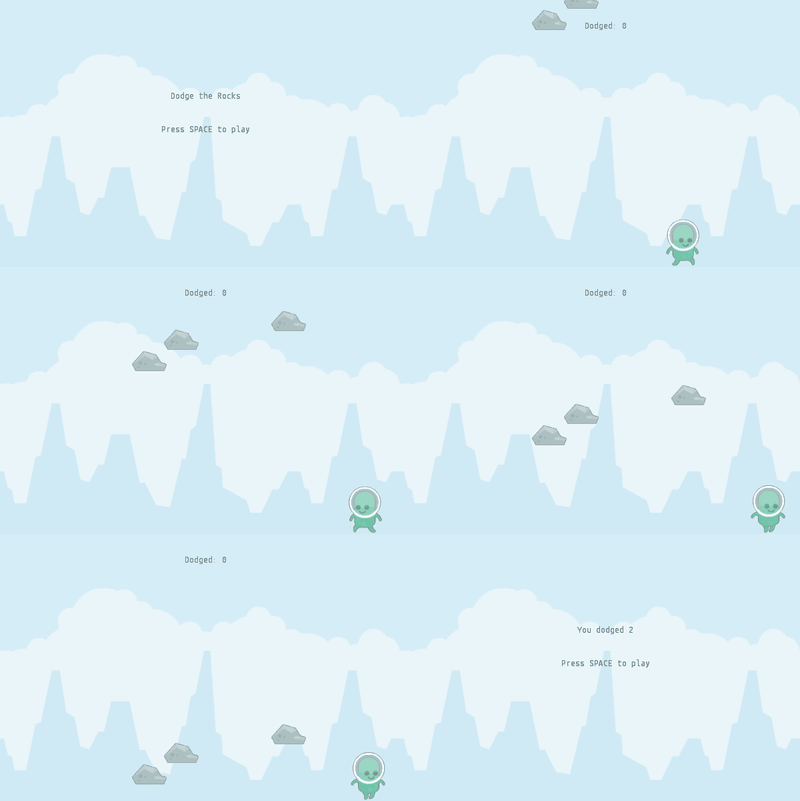
Nothing here needs a downloaded file.
Step 1: A window of its own
Since the first chapter, main has opened a window and put a stage into it. A
stage is one screen of your project. The window is the thing on your desktop
that the screen is drawn in. This game gets three screens - a title, the game
and a game-over screen - but it still has one window.
With more than one screen it helps to give the window a class of its own, which decides what is shown first:
import org.openpatch.scratch.*;
public class DodgeWindow extends Window {
public DodgeWindow() {
super(600, 400);
this.setStage(new TitleStage("Dodge the Rocks"));
}
public static void main(String[] args) {
new DodgeWindow();
}
}
The size is the window's, and setStage says which screen to show first. The
stages take no size - they are all drawn in the same window.
There is only ever one window. new Window(...) a second time is an error,
and the library will say so. Stages you can make as many as you like.
Step 2: A screen that waits
The title screen has no sprites on it. It is two pieces of text and one thing it listens for:
import org.openpatch.scratch.*;
public class TitleStage extends Stage {
public TitleStage(String message) {
this.addBackdrop("background");
Text title = new Text();
title.setPosition(0, 60);
title.setTextSize(30);
title.setAlign(TextAlign.CENTER);
title.showText(message);
this.add(title);
Text hint = new Text();
hint.setPosition(0, 10);
hint.setTextSize(18);
hint.setAlign(TextAlign.CENTER);
hint.showText("Press SPACE to play");
this.add(hint);
}
public void whenKeyPressed(KeyCode keyCode) {
if (keyCode == KeyCode.SPACE) {
Window.getInstance().setStage(new GameStage());
}
}
}when [space v] key pressed
Two things are worth stopping at.
whenKeyPressed on a stage is the same block you already know, except that
the stage hears it rather than a sprite. A title screen has no sprite to put it
on, which is exactly why stages can listen too.
Window.getInstance() is how you reach the window from anywhere in your project.
You made it in main, but you do not have to pass it around — there is only one,
so the library will hand it to you when you ask.
And the message is a parameter, which is the whole trick of this chapter. The same class is the title screen and the game over screen.
Step 3: The game
The alien is the walker from Make it Walk, a little smaller and a little faster:
import org.openpatch.scratch.*;
public class Alien extends Sprite {
public Alien() {
this.addCostume("alienGreen_stand");
this.addAnimation("walk", "alienGreen_walk%d", 2);
this.setAnimationInterval(0.15);
this.setSize(45);
this.setRotationStyle(RotationStyle.LEFT_RIGHT);
this.setY(-140);
}
public void run() {
boolean walking = false;
if (this.isKeyPressed(KeyCode.RIGHT)) {
this.setDirection(90);
this.move(4);
walking = true;
}
if (this.isKeyPressed(KeyCode.LEFT)) {
this.setDirection(-90);
this.move(4);
walking = true;
}
if (walking) {
this.playAnimation("walk");
} else {
this.switchCostume("alienGreen_stand");
}
this.ifOnEdgeBounce();
}
}The rocks fall like the coins in Catch the Coins, but they are worth a point for missing you rather than for hitting you:
import org.openpatch.scratch.*;
public class Rock extends Sprite {
public Rock() {
this.addCostume("rock");
this.setSize(40);
this.dropFromTop();
}
private void dropFromTop() {
this.setX(Random.randomInt(-280, 280));
this.setY(Random.randomInt(220, 420));
}
public void run() {
this.changeY(-3);
if (this.isTouchingSprite(Alien.class)) {
((GameStage) this.getStage()).gameOver();
}
if (this.getY() < -200) {
((GameStage) this.getStage()).addDodge();
this.dropFromTop();
}
}
}And the stage they live on keeps the score, exactly as the catching game did:
import org.openpatch.scratch.*;
public class GameStage extends Stage {
private Text scoreText = new Text();
private int dodged = 0;
public GameStage() {
this.addBackdrop("background");
this.scoreText.setPosition(0, 165);
this.scoreText.setTextSize(20);
this.scoreText.setAlign(TextAlign.CENTER);
this.add(this.scoreText);
this.showScore();
this.add(new Alien());
for (int i = 0; i < 3; i++) {
this.add(new Rock());
}
}
public void addDodge() {
this.dodged = this.dodged + 1;
this.showScore();
}
public void gameOver() {
Window.getInstance().setStage(new TitleStage("You dodged " + this.dodged));
}
private void showScore() {
this.scoreText.showText("Dodged: " + this.dodged);
}
}All four classes together. Press SPACE to start, arrow keys to dodge — and when a rock gets you, SPACE again, on a stage that is genuinely new:
Notice what gameOver does not do. It does not stop the rocks, empty the
score, or put the alien back in the middle. It builds a TitleStage and hands
it to the window, and the old game — alien, rocks, score and all — is simply
gone.
Step 4: Starting again is free
Press SPACE on the game over screen and TitleStage runs
Window.getInstance().setStage(new GameStage()) again. That new gives you a
brand new stage: a new score of zero, a new alien in its starting place, three
new rocks at new random heights.
This is why screens are worth the trouble. Resetting a game by hand means remembering every single thing that changed while it was played, and the bug you get when you forget one is miserable to find. Throwing the whole screen away and building another cannot forget anything.
In Scratch, a project is one stage, and starting over means setting every variable back by hand at the top of the green flag script. Being able to throw a screen away and make a new one is one of the few places where the Java version is genuinely simpler than the blocks.
The finished project
If something will not run, you can compare against the finished version. It needs no assets, only the library itself.
Project: Dodge the Rocks 100%Things to try
One rock, two rocks
The game over screen says "You dodged 1" when you only dodged one rock. Make it say "1 rock" and "2 rocks".
Hint
Build the text in gameOver with an if: one text when dodged is 1, another
one otherwise.
Solution
public void gameOver() {
String text = "You dodged " + this.dodged + " rocks";
if (this.dodged == 1) {
text = "You dodged 1 rock";
}
Window.getInstance().setStage(new TitleStage(text));
}A help screen
Add a screen between the title and the game that explains the controls, and make SPACE walk through title, help and game.
Hint
A screen is a stage. Write a HelpStage like TitleStage, and let SPACE on the
title screen open the help screen instead of the game.
Solution
import org.openpatch.scratch.*;
public class HelpStage extends Stage {
public HelpStage() {
this.addBackdrop("background");
Text help = new Text();
help.setPosition(0, 20);
help.setTextSize(18);
help.setAlign(TextAlign.CENTER);
help.showText("Move with the arrow keys. Do not get hit!");
this.add(help);
}
public void whenKeyPressed(KeyCode keyCode) {
if (keyCode == KeyCode.SPACE) {
Window.getInstance().setStage(new GameStage());
}
}
}In TitleStage, SPACE now opens the help screen:
public void whenKeyPressed(KeyCode keyCode) {
if (keyCode == KeyCode.SPACE) {
Window.getInstance().setStage(new HelpStage());
}
}Faster rocks
Speed the rocks up as the score climbs.
Hint
dodged is on the stage, and the rocks can already reach the stage: they call
addDodge on it. Give GameStage a method that returns dodged, and let the
rocks use it in changeY.
Solution
In GameStage:
public int getDodged() {
return this.dodged;
}In run() of Rock, instead of this.changeY(-3);:
GameStage game = (GameStage) this.getStage();
this.changeY(-3 - game.getDodged() / 5.0);Every five rocks dodged make the rocks one step per frame faster.
Best score
Keep the best score so far. It cannot live on GameStage, because that object
is thrown away every game. Where does it have to go instead?
Hint
It needs to live somewhere that is not thrown away. The window stays for the
whole program. Or use a static field: it belongs to the class, not to one
object, so there is only one, however many games are played.
Solution
In GameStage:
private static int best = 0;
public void gameOver() {
if (this.dodged > best) {
best = this.dodged;
}
Window.getInstance().setStage(
Window myWindow = new Window(480, 360);
myWindow.setStage(new TitleStage("You dodged " + this.dodged + ". Best: " + best)));
}