
Guess the Number
The computer thinks of a number and you try to find it. This is the first project where the program asks you something and does different things depending on the answer.
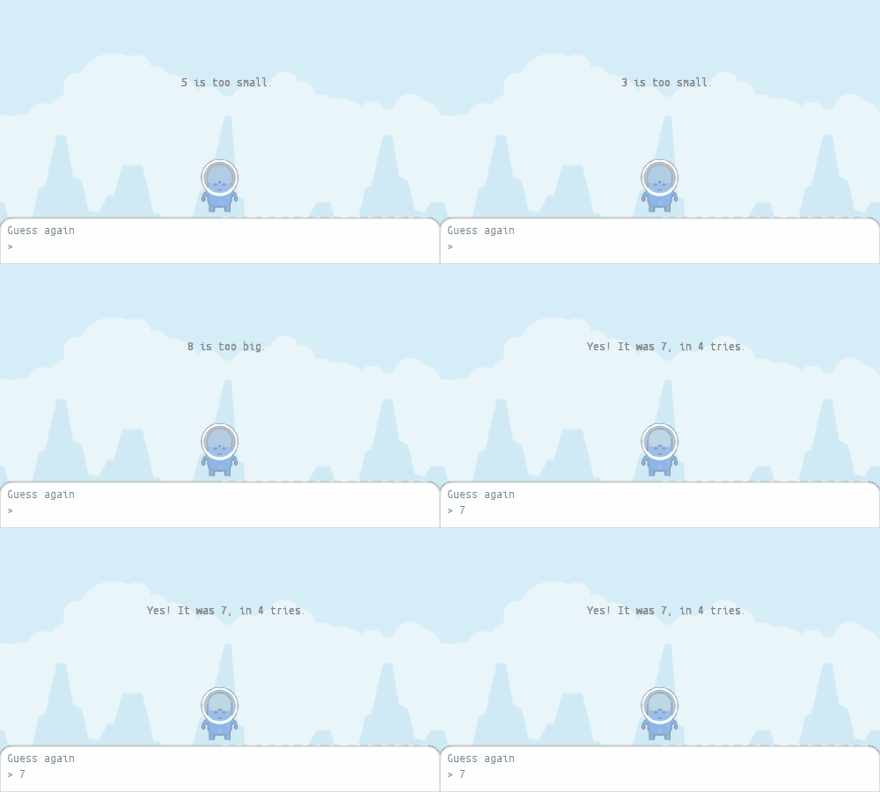
The whole thing is one class, and it needs no files at all.
Step 1: Ask a question
ask() puts a box at the bottom of the stage, exactly where Scratch puts it, and
collects what you type until you press Enter. getAnswer() gives you back what
was typed.
ask [Guess a number between 1 and 10] and wait
Start with this much:
import org.openpatch.scratch.*;
public class GuessStage extends Stage {
private int secret = Random.randomInt(1, 10);
public GuessStage() {
this.addBackdrop("background");
this.ask("Guess a number between 1 and 10");
}
public static void main(String[] args) {
Window myWindow = new Window(500, 300);
myWindow.setStage(new GuessStage());
}
}Step 2: One important difference from Scratch
In Scratch, ask and wait stops the script until you answer. In Java it does
not: run() keeps being called about 60 times a second while the question sits
on screen.
So instead of waiting, you check whether a question is still open:
public void run() {
if (this.isAsking()) {
return; // the question is still on screen, come back next time
}
// there is an answer waiting
}That return is doing the job Scratch's "wait" does for you.
Step 3: React to the answer
getAnswer() always gives you text, even when someone types a number, so it
has to be turned into a number first. If they typed something that is not a
number at all, Integer.parseInt fails, and the catch block deals with it.
Here is the finished class:
import org.openpatch.scratch.*;
public class GuessStage extends Stage {
private int secret = Random.randomInt(1, 10);
private int tries = 0;
private boolean solved = false;
private Text hint = new Text();
public GuessStage() {
this.addBackdrop("background");
this.hint.setPosition(0, 60);
this.hint.setTextSize(20);
this.add(this.hint);
Sprite wizard = new Sprite();
wizard.addCostume("alienBlue_front");
wizard.setSize(40);
wizard.setY(-40);
this.add(wizard);
this.ask("Guess a number between 1 and 10");
}
public void run() {
if (this.solved || this.isAsking()) {
return;
}
int guess = 0;
try {
guess = Integer.parseInt(this.getAnswer().trim());
} catch (Exception e) {
this.hint.showText("That is not a number. Try again!");
this.ask("Guess a number between 1 and 10");
return;
}
this.tries = this.tries + 1;
if (guess < this.secret) {
this.hint.showText(guess + " is too small.");
this.ask("Guess again");
} else if (guess > this.secret) {
this.hint.showText(guess + " is too big.");
this.ask("Guess again");
} else {
this.hint.showText("Yes! It was " + this.secret + ", in " + this.tries + " tries.");
this.solved = true;
}
}
public static void main(String[] args) {
Window myWindow = new Window(500, 300);
myWindow.setStage(new GuessStage());
}
}Play it here — type a number into the box at the bottom of the stage and press Enter:
The solved variable is easy to forget, and leaving it out gives a strange bug.
Once the number is guessed, no new question is asked, so isAsking() stays
false — and run() happily counts the same answer again on every single frame.
The number of tries races upwards. solved is what stops it.
The finished project
If something will not run, you can compare against the finished version. It needs no assets, only the library itself.
Project: Guess the Number 100%Things to try
Only five tries
Give the player only five tries.
Hint
tries already counts. After a wrong guess, check whether it has reached 5. If
so, tell the player the number and set solved to true, so the game stops
asking.
Solution
The end of run():
this.tries = this.tries + 1;
if (guess == this.secret) {
this.hint.showText("Yes! It was " + this.secret + ", in " + this.tries + " tries.");
this.solved = true;
} else if (this.tries >= 5) {
this.hint.showText("No more tries. It was " + this.secret + ".");
this.solved = true;
} else if (guess < this.secret) {
this.hint.showText(guess + " is too small.");
this.ask("Guess again");
} else {
this.hint.showText(guess + " is too big.");
this.ask("Guess again");
}The check for the right answer now comes first, so a correct fifth guess still wins.
The wizard speaks
Let the wizard say() the hints instead of writing them at the top.
Hint
wizard is a local variable in the constructor, so run() cannot reach it. Make
it a field of the stage, like hint.
Solution
At the top of GuessStage, next to hint:
private Sprite wizard = new Sprite();In the constructor, use this.wizard instead of creating a new sprite:
this.wizard.addCostume("alienBlue_front");
this.wizard.setSize(40);
this.wizard.setY(-40);
this.add(this.wizard);
In run(), replace each this.hint.showText(...) with this.wizard.say(...),
for example:
this.wizard.say(guess + " is too small.");What's your name?
Ask for the player's name first and use it in the hints.
Hint
Ask for the name in the constructor instead of the number. Keep the name in a
field that starts out as null, which means "not known yet". The first answer
that arrives in run() is the name.
Solution
A new field:
private String name = null;In the constructor, the first question becomes:
this.ask("What's your name?");At the start of run(), right after the check for isAsking():
if (this.name == null) {
this.name = this.getAnswer();
this.ask("Guess a number between 1 and 10, " + this.name);
return;
}
Now this.name can go into every hint, for example
this.name + ", " + guess + " is too small.".